
Beginning Professionals
Are you new to editing? Worried about how much you don't know yet? Don't be. You'll get there. Everyone starts somewhere.
In the meantime, you do belong. You have the exact same right to be making films and videos as everyone else. Don't get discouraged. Don't give up.
Failure is the BEST option.
Your filmmaking heroes were once newbies. They grew into their careers. Experience isn't built by getting every thing right. It's built by making mistakes, learning from them, and having the courage to try again.
So, I encourage everyone to fail, and fail often. That's how you'll gain confidence and grow into your career, like how your heroes did.
In the meantime, if you're looking to learn some quick confidence boosting tricks, click here:

You've already been inspired to start your film editing journey. I know this because... you're here! I'll assume you also have an artistic vision for what you hope to accomplish in your projects. So, I'll not bore you with platitudinous welcome remarks.
Let's dive right in... starting with one of the hardest topics.
1. Frames and frame rates: the illusion of motion
A picture is worth a thousand words. That's especially true when it isn't moving.
Yet something remarkable happens when we show our brains a series of still pictures, one after another, at a rapid pace. If 24 individual images are shown over the span of one second, we perceive movement. We don't see 24 separate photographs. We see a person walking, a car speeding down a street, or an actor turning toward the camera.
This is the magic of motion pictures: the illusion of movement created by a sequence of still images.
The effect is fundamentally the same whether you're watching a motion picture shot on 35mm film or a modern production captured in 4K digital video. The technology used to capture and display the images may be different, but the underlying principle remains the same.
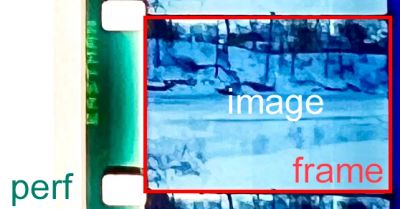
What is a "frame" in video or film?
Think of a frame in motion pictures just like a picture frame on your wall. It establishes the boundaries around a single image. Filmmakers often use the word frame to refer to both the boundaries and the image contained within.
Here's where it becomes cinematic... In film, the cinematographer also uses the word as a verb. They frame the shot by intentionally composing everything within those boundaries. Every visual element is carefully considered, not only to show the action, but also to establish mood, convey emotion, guide the viewer's eyes and attention, and contribute to the entire thread of the story being told.
The frame is your artist's canvas. Don't simply record what's happening. Make deliberate visual choices about how the audience will experience what's happening, and then bolster this with additional sensory inputs, which you add in the edit.

What is "frame rate"?
Frame rate refers to not one frame, but many, played sequentially. The "rate" is the number of individual frames displayed or captured every second, measured as frames per second, abbreviated as fps.
24 fps — The motion picture standard
For nearly a century, 24 frames per second has been the traditional frame rate for theatrical motion pictures. It produces the familiar motion characteristics we associate with cinema.
30 fps — Television and video
Commonly used in television, online video, and other video productions. It produces slightly smoother motion. Examples of some broadcast frame rates are 30i, 29.976, and 59.94. Depending on the broadcaster's specs, they may also ask for interlaced scanning instead of progressive, and also for drop-frame timecode.
60 fps — Smooth motion and slow motion
Often used for sports, action, and high-motion content. When played back at 30 fps, footage captured at 60 fps can produce smooth half-speed slow motion.
Example: Animation
Frame rates affect how we see motion. Ever notice how old television shows seems smoother than films projected in a theater? Ever notice how the Peanuts movies like A Charlie Brown Christmas feel different? It's all intentional. Here are some of the frame rates you'll encounter as a filmmaker:
- "Animating on ones": A new drawing or image is created for every frame of playback. At 24 fps, that's 24 individual drawings per second. This can make animation feel almost lifelike.
- "Animating on twos": Each drawing is held for two consecutive frames. At 24 fps, that means 12 individual drawings per second. Example - the Peanuts movies.
- "Animating on threes": Each drawing is held for three consecutive frames, or 8 individual drawings per second at 24 fps.
Note: Anime often combines all three techniques, sometimes within the same scene. This is sometimes called frame-rate modulation: varying the rate in one scene vs another to achieve a particular visual or emotional effect.
Why should you care?
Frame rate is not just a technical setting. It's a creative decision. A filmmaker who understands frame rates can influence how an audience experiences movement, pacing, and even the emotional character of a scene.
- Want the familiar look of a theatrical motion picture? You might choose 24 fps.
- Want exceptionally smooth motion? You might choose 60 fps.
- Want beautiful slow motion? You might record at a higher frame rate and play those images back at a slower rate.
You aren't simply choosing how many pictures to take. You're choosing how movement will be experienced by your audience.

Boredom check
If this is too much detail and tech stuff, don't worry. It's about to get more fun... but if you need an inspirational break, click here: (and then come back)...
Frame rate: Your first creative decision
Every editing project begins with two questions:
- When I'm done making this film, where is it going to be played?
- What "specs" do they require of me? (format, frame rate, size...)
People who don't answer these questions may find out they need to spend extra days or even weeks going back into editing to rework the film to match the delivery requirements. So, before creating a project inside of an editing app, let's establish a few technical specifications.
>> Exercise
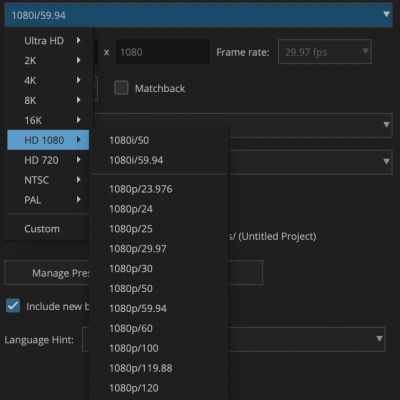
Let's assume we're making a short narrative film intended to look and feel like a traditional theatrical motion picture. We learn that the film we are creating will be sent to film festivals, and that they gladly accept many frame rates. However they request that it be sent in an HD format (1080p or 720p) because their projectors don't have the ability to play 4K.
We open the editing app, and it asks us what kind of a project to create. We see formats and frame rates. It's all too confusing. So... Which do we choose?
A warning about 4K
4K is better, right? No, not always. Just because you can edit in 4K doesn't mean you should. Smart production companies always budget for each project, and make their 4K decision based on time, cost, and effort.
4K contains 4 times as many pixels as HD. That means 4x the work is added to your project. Next time you go to a restaurant, don't order 1 cheeseburger, order 4. Then sit there and eat all 4. Can you do it in the same amount of time as one? Of course not. Neither can your computer.
- 4x the storage. If you shoot and edit HD and it results in 2 TB of space filled up on a hard drive, then shooting and editing the exact same thing in 4K means you will fill up 8 TB of space. Do you have enough har drives? Can your budget afford that?
- 4x the transfer time. Got shots on camera cards? Need to move them to a hard drive in the evening so you can reuse the cards in the morning? Expect to stay up late.
- 4x the computer processing. In 4K, your computer doesn't see a prettier shot. It sees more work to do. Expect the fans to be constantly running; the graphics card constantly in overdrive; everything on your computer behaving 4x slower.
- 4x the editing project's time to "render" effects. The more effects you have stacked in 4K, the longer you'll be waiting for the editing app to complete its rendering tasks.
The solution is to make conscious decisions about which projects you think deserve to be in 4K. There are numerous sizes of 4K. YouTube's isn't really 4K, its UHD. Then there's 4K DCI Flat; then 4K DCI Full; then 4K DCI Scope, then 4K Full Aperture. Before the Director commits to shooting, they should discuss the specs of DELIVERY with you.
Getting organized will FREE your creativity
A disorganized filmmaker spends more time fighting the process than telling the story.
Good organization isn't about being obsessive or creating paperwork for its own sake. It's about building habits that let you concentrate on the creative work instead of constantly searching for files, fixing avoidable mistakes, or trying to remember where you left off. Start with a consistent folder structure for every project. Give files and sequences meaningful names. Keep your media organized, your project files backed up, and your versions clearly identified. Develop a system that makes sense to you, and use it consistently.
Most importantly, don't wait until a project becomes chaotic to get organized. Take a few minutes at the beginning of each project to establish your workflow, and a few minutes at the end of each editing session to tidy up. You'll spend less time hunting, troubleshooting, and backtracking—and more time doing what you came here to do: making something wonderful.


Step 1: OUTSIDE of the Edit
Good organization isn't about being obsessive or creating paperwork for its own sake. It's about concentrating on the creative work instead of:
- constantly searching for files
- fixing avoidable mistakes
- trying to remember where you left off
Start with a [consistent folder structure] for every project. (See image above.)
Give files and sequences meaningful names. Keep your media organized, your project files backed up, and your versions clearly identified. Develop a system. Take a few minutes at the beginning to establish your workflow, and a few minutes at the end of each editing session to tidy up.
Why should you care?
Organization isn't just an administrative skill. It's a creative advantage. The sooner a new filmmaker develops good habits, the easier their creative life will become.
Every project can involve dozens of video clips, audio recordings, music tracks, graphics, photographs, and project files. If you don't know where things are, you'll waste time searching instead of creating.

Step 2: INSIDE of the Edit
This is what a good initial project looks like.
! SEQ - this is where you will be placing ALL of your timeline's SEQUENCES.
GPX - for any graphics you may bring in, like logos, still-images, and photographs.
Media - Where TRANSCODED media will go.
Music - keep all your music in this bin, separate from other audio.
Raw - This is where you initially link all your media, prior to transcoding.
SFX - Audio sound effects go here. Foley, roomtone, whatever you like.
Titles - Move all your on-screen titles into this separate bin.
Xport - This is your paper trail for everything that you have exported to clients. Whenever you export something, go the extra step and Link to it in this bin. It'll keep a record of every time you have sent something to someone.
Once you get deeper into your editing, you'll of course begin to add other bins to this project. I've had projects with hundreds of bins. But this is a great start.
Why should you care?
Pretend it’s 2027. You want to get into your 2022 project and work on it as if time didn’t pass and everything was still there. Well, now it is!
Did you get a new computer since then? Of course you did. But before you did so, you dragged all your years worth of work onto an external hard drive, and then back onto your new computer’s drive.

More to come...
I'll be back with more. I have a curriculum, and I'm in the middle of editing it into digestible bites for this site.
In the meantime... Do you agree with this influencer's assessment of the 10 best edited movies of all time?